With every new iOs update, Apple pushes a bunch of great features and tricks, some of which they will show in the Keynote and others that they don't. Which means there a lot of iPhone features that a lot of people aren't aware of.


The iPhones and iPads pack in a ton of features, thanks to regular updates to iOS. However, there are some really cool hidden iPhone features that people aren't very well known. We show you 5 hidden iPhone features that you should be using.
Also Read: 4 Hidden Android Features 2017
Also Read: 4 Hidden Android Features 2017
1. Guided Access
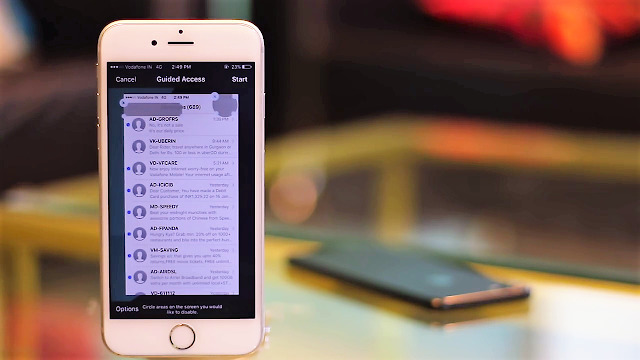
Guided Access is a useful feature that most of the people don't use. The feature allows you to pin a particular app to the screen and not get out of it without entering a passcode or touch ID. Just like the screen pinning feature in android, guided access works pretty much the same way in iPhone.
To enable Guided Access:
Go to settings ==> General ==> Accessibility ==>Scroll down and tap on Guided Access, and turn the Guided access toggle to on.
Now to the app that you want to pin to the screen, TRIPLE CLICK the Home button on the iPhone to start Guided Access. You can even deny access to the specific area of the screen by drawing boxes around it. Also, you can tap on options to configure the buttons that user will have access to(while the phone is in Guided Access mode). You can even set a time limit on the Guided Access feature.

2. Prioritize App Downloads
We all know that feeling when we put a lot of apps to download at the same time, only to realize that they will take a long time to download completely. If you are in such a situation and you want one of the downloading apps to finish first, you can use 3D touch(iPhone 6s and above) to prioritize it.
When you are downloading multiple apps, simply 3D touch on the app that you want to prioritize to download first, and from the menu that pops up, tap on 'Prioritize download'. Your iPhone will now allocate more bandwidth to the app that you prioritized, which will make it download, before the other apps that are downloading.
 |
| Prioritize Downloads |
3. Announce Caller
Let's say, you are working and your phone is in your pocket when you receive a call. You could take it out of your pocket and check who is calling but it might turn out it would not be an important call at all. That would be extremely frustrating. Well, you can use Siri to figure out who is calling and not even have to pull your phone out to check who's calling.
To enable this feature, just go to:
Settings ==> Phone ==> Announce calls, now you can choose when you want Siri to announce Caller names for you, and it will do it.
So the next time you are working and you get a call, Siri will inform you about who is calling you, so you don't have to waste time for calls that are not urgent.

4. Use Camera as a Magnifier
You must be aware of the zoom accessibility feature in iOs. However, there is also another feature called the Magnifier which essentially turns the iPhone camera into a magnifying glass. To enable this feature, go to:
Settings ==> General ==> Accessibility ==> Magnifier ==> Turn the toggle to on.
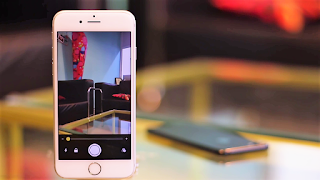
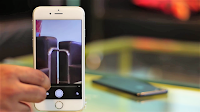
Now you can trippe click the home button to turn the magnifier on. The iPhone displays a special camera interface when the magnifier is turned on. You can use the slider on the bottom to adjust the magnification ad you can even click pictures with this. This is definitely a feature that you find useful when trying to decipher what's written on the back of those tiny packages.
Settings ==> General ==> Accessibility ==> Magnifier ==> Turn the toggle to on.
Now you can trippe click the home button to turn the magnifier on. The iPhone displays a special camera interface when the magnifier is turned on. You can use the slider on the bottom to adjust the magnification ad you can even click pictures with this. This is definitely a feature that you find useful when trying to decipher what's written on the back of those tiny packages.


5. Custom Vibrations For Contacts
Another really cool thing that you can do on your iPhone is to set custom vibration patterns for your contacts. This can help you easily identify the caller based on the way your phone vibrates. To set custom vibrations, Go to:
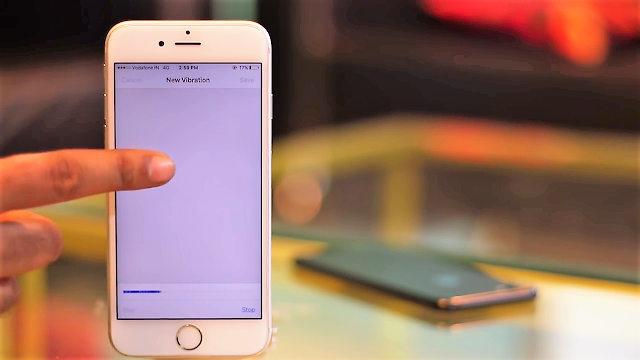
Contacts ==> Select the contact that you want to set the custom Vibration for ==> Edit ==> Ringtone ==> Vibration. You can select one of the standard vibration patterns or you can create new vibration by tapping 'Create new vibration'. In the next screen, you can to create vibration pattern. Short tap results in short vibration and long tap results in longer vibration. Once you are done, simply click on save, enter the name for the vibration just created, and it will be automatically assigned to the contact.

Conclusion
Well, those were the 5 hidden iPhone features that you should be using. I hope you found this article interesting. If you know any other hidden feature make sure you add that in the comment section.
Comments
Post a Comment
Its all about friendly conversation's here, so why not post a lovely comment...